When you die, the photos in your iCloud Photos library stay in your Apple Account until someone with the right documents asks Apple for them or the account is deleted. Photos stored only on your iPhone, not in iCloud, are usually lost to your family unless someone knows your passcode, because Apple can’t unlock the device for them.
So the answer depends on where each photo lives, and on what you set up while you can. This page explains the three places your photos can be, what your family can reach in each, and the short list of things worth doing this week.
This is general information, not legal advice. Rules on access to a person’s accounts after death differ by country and state.
Where your photos actually are
1. In iCloud Photos. If iCloud Photos is on (Settings → your name → iCloud → Photos on iOS 18 and later), your full library is stored in your Apple Account. This is the part your family can most easily reach, through Apple’s process.
2. Only on the device. If iCloud Photos is off and you don’t use iCloud Backup, your photos exist only on the iPhone (and perhaps in a computer backup). An iPhone’s storage is encrypted with a key tied to its passcode. Without the passcode, Apple can’t unlock it for your family. After repeated wrong guesses the iPhone locks for longer and longer, and if Erase Data is on (Settings → Face ID & Passcode), it erases itself after 10 failed attempts.
3. In an app with its own encryption. Photos you keep in a private vault app, a secure folder or an encrypted cloud service follow that app’s rules, not Apple’s. If the app is any good, Apple can’t hand them over, because Apple doesn’t have the key. Bunker works this way: a vault stays encrypted inside your iPhone and inside your iCloud backup, and only its Pattern or its Recovery Phrase opens it.
What your family can get from Apple
Apple offers two routes into a deceased person’s account.
With a Legacy Contact. If you added one, they can request access with the access key you gave them and a copy of your death certificate. Apple reviews the request. According to Apple’s support pages (checked Oct 24, 2026), an approved Legacy Contact can reach iCloud Photos, notes, mail, messages in iCloud, iCloud Drive files and anything in an iCloud Backup, which can include photos and videos stored on the device. They can’t reach your iCloud Keychain (passwords and passkeys), payment details, or the movies, music and books you bought. Access lasts 3 years from when Apple approves the first request; after that, Apple permanently deletes the account. How to set up Apple Legacy Contact has the steps.
Without a Legacy Contact. In the US, Apple says a court order naming the next of kin as the rightful inheritor of the person’s personal information can grant access to the account. Only one person can make that request, and some end-to-end encrypted data may stay out of reach. Other countries accept other documents. This takes time and usually a lawyer. Ask someone like James Miller, the family lawyer in our examples, what your state requires.
Neither route unlocks the iPhone itself. Once a Legacy Contact is approved, Apple removes Activation Lock so the devices can be erased and reused, but erasing removes what’s on them.
Photos that matter most need a plan of their own
Most family photos are fine in iCloud with a Legacy Contact set up. Some aren’t:
- Private photos you don’t want everyone to see, such as medical photos, documents or pictures meant for one person. A Legacy Contact gets your whole iCloud library, and you can’t exclude categories.
- Photos you’ve hidden or locked away. The Hidden album in Photos is part of iCloud Photos, so a Legacy Contact can reach it. Photos inside an encrypted vault app can’t be reached that way at all.
- Scans of papers your family will need, such as a will, deeds, policies and an account list. These are better kept where the right people can find them quickly, not inside a 3,000-photo library. Where to keep important documents covers this.
For these, decide who should see them and how they’ll reach them.
Three things to set up now
-
Add an Apple Legacy Contact. Settings → your name → Sign-In & Security → Legacy Contact → Add Legacy Contact. Give them the access key on paper or by iMessage, and keep a copy with your important papers. It’s free and takes 5 minutes.
-
Share the everyday photos while you’re here. iCloud Shared Photo Library lets up to 6 people share one library, so your partner or children already have the family photos and don’t need to request anything. On iOS 18 and later it’s under Settings → Apps → Photos → Shared Library.
-
Decide what happens to the private ones. If you keep private photos and documents in Bunker, you have three choices:
- Let them go. Nobody gets them. That’s a fair choice for some things, and it’s what happens by default.
- Leave the Recovery Phrase for one vault with your will or with your lawyer. Whoever has it, and also has your device or your Apple Account with Encrypted Backup on, can open that vault fully, at any time, so treat it like a key to the vault.
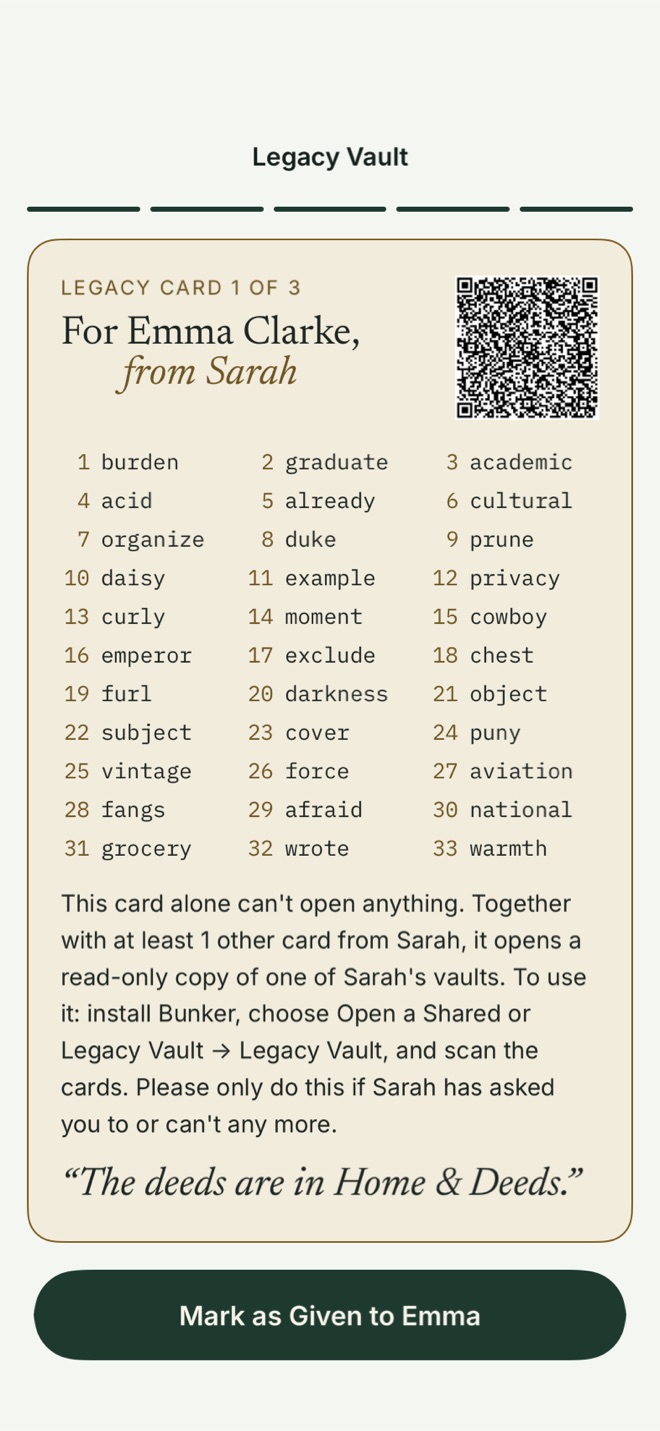
- Make it a Legacy Vault. You choose up to 5 trusted contacts and how many must come together, for example any 2 of 3. Each gets a printed Legacy Card. Together, enough cards open a read-only copy of that one vault; your other vaults are never included. See Legacy Vaults.
An example
Sarah keeps 3 kinds of photos. The family ones are in iCloud Photos, shared with her partner through Shared Photo Library. She adds her daughter, Emma Clarke, as her Apple Legacy Contact, so Emma could reach the rest of her iCloud data later.
Her scans of the house deeds, her insurance policies and a few photos meant only for her children sit in a Bunker vault called “Family Papers”. She makes it a Legacy Vault with any 2 of 3 cards, held by Emma, her friend Olivia Bennett and her lawyer, James Miller. She writes a short letter inside the vault saying what’s where.
The limit to know about
A Bunker Legacy Vault can’t tell whether you have died. In this version, enough trusted contacts acting together can open it at any time, including while you’re alive. Bunker usually lets your devices know afterwards, but that’s best-effort and it doesn’t stop them. A waiting period you could cancel is planned, not built. So give cards only to people you’d trust with that vault today.
And if all you need is for your family to get the everyday photos, you don’t need Bunker for that. Shared Photo Library and a Legacy Contact cover it.
Related
- The Legacy guides
- How to give your family access to your iPhone
- Digital estate planning checklist
- What to put in an “if something happens to me” folder
Questions
Can my family get my iPhone photos if they don't know my passcode?
Only the ones in iCloud. With a Legacy Contact access key and a death certificate, or with a court order in the US, Apple can give access to iCloud Photos and iCloud Backups. Photos that exist only on a locked iPhone generally can't be recovered without the passcode.
Does Apple delete my iCloud photos when I die?
Not automatically, but your family can ask Apple to delete the account. If a Legacy Contact is approved, Apple says the account is permanently deleted 3 years after it approves the first request, so download what matters before then.
Can a Legacy Contact see photos in Bunker?
No. A Bunker vault stays encrypted inside your iCloud data. Only its Pattern, its Recovery Phrase or, for a Legacy Vault, enough Legacy Cards open it.