Legacy Vaults
A Legacy Vault lets the people you trust open a read-only copy of one of your vaults together, if something happens to you. Each trusted contact gets a printed Legacy Card; alone, a card opens nothing, and together the number you chose (for example any 2 of 3) opens the copy.
For the bigger picture of planning for your family, start with the Legacy hub. If you’re holding a card and need to use it, see how to open a Legacy Vault.
How it works
In the vault you want to pass on, go to Vault Settings → Legacy and follow the steps:
- Read what it means. Your trusted contacts will know this vault exists. They can’t open it alone. Together they could open it at any time. Your other vaults are never included.
- Add trusted contacts, up to 5. On iPhone you can pick them from Contacts; Bunker doesn’t need their email or Apple Account. Add a short personal note for each, printed on their card.
- Choose how many are needed. Any 2 of 3 is the default. Pick more than one so nobody can open it alone, but not all of them, in case someone can’t be reached. A single contact (1 of 1) is allowed, and that card then opens the vault on its own.
- Write a letter. Bunker adds a prefilled “Letter to my trusted contacts” note: what’s in the vault, who should get what, and who to call, such as your family lawyer.
- Give out the cards. Print is the default. Mark each card as given when you hand it over.
What’s on a card
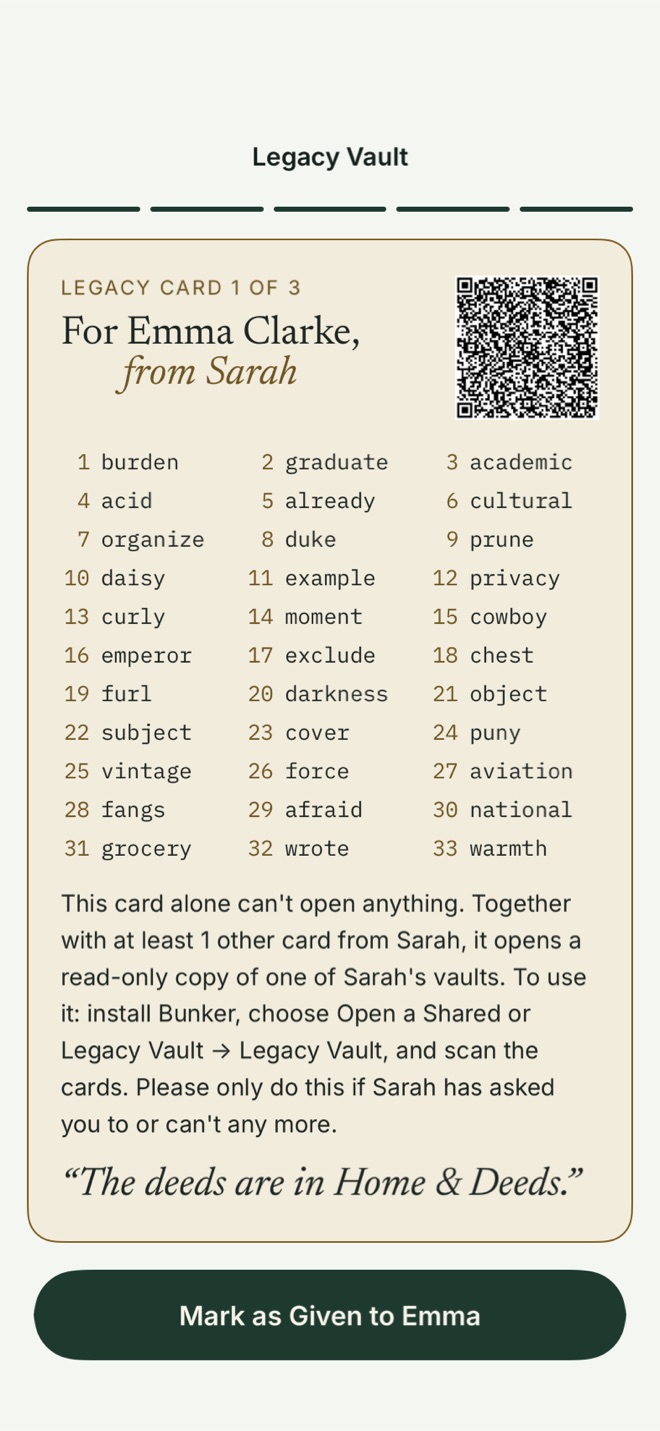
Each card is one page with a QR code and 33 words. The words follow SLIP-0039, a published standard for splitting a secret into parts so that any k of n parts rebuild it and fewer reveal nothing about it. It also builds in a checksum that catches typos and a check that spots a card from a different set. The card says, in plain words, what it is and how to use it, and asks the holder to use it only if you’ve asked them to or can’t any more.
The copy your contacts open
Bunker publishes an encrypted, read-only copy of the vault to Bunker’s public iCloud database, under fresh keys and record names that only the combined cards can work out. It’s stored outside your own iCloud account, so it’s designed to keep working if that account is closed after your death. It stays current: when you add or change items, the copy updates on the next sync. The limit is 1 GB per Legacy Vault; photos and videos go in at Optimized quality to fit.
For family members who’d rather not rely on an app or iCloud, Vault Settings → Legacy → Save Offline Archive gives you an offline archive: an encrypted .bunker-legacy file you can give to your lawyer or keep on a USB drive. The same cards open it with no network.
When cards are combined
Your contacts install Bunker (free), choose Open a Shared or Legacy Vault → Legacy Vault, and scan or type their cards on one device. Bunker says how many more cards it needs, never who holds them. Once enough are present, they draw a Pattern for their copy and download it. They can export from it; passing things on is the point.
When they open it, Bunker leaves a small record that your devices look for when they sync, and shows you a notification with neutral text. It’s a signal, not a veto, and it relies on their app reporting honestly.
Keeping it up to date
Once a year Bunker reminds you to check the contacts, the letter and any offline archive. Changing who’s included, or how many are needed, issues new cards to everyone, and old cards stop opening the published copy (an offline archive saved earlier still opens with them). Turning Legacy off deletes the published copy.
After setup, Bunker also suggests Apple’s own Legacy Contact (Settings → your name → Sign-In & Security → Legacy Contact), which covers your Apple Account and devices. See Apple Legacy Contact.
What it protects against
- Your family being locked out of what they need after you die or can’t open the vault.
- Any one person, including us, Apple or a single contact, opening it alone (unless you chose 1 of 1).
- A lost or stolen single card: on its own it’s useless, and you can replace the whole set.
What it doesn’t protect against
- Contacts acting early. In this version there’s no waiting period. Enough contacts together can open the vault at any time, including while you’re alive, and you’ll usually only hear about it afterwards. A waiting period you could veto is planned for a later version.
- Copies already taken. If contacts opened it before you changed or turned off Legacy, they keep what they downloaded, and an offline archive made before a change still opens with the old cards. Destroy old archives.
- Cards kept together. Two cards in one drawer are one card. Don’t store a card inside the vault it opens.
- Sending cards digitally. A card sent by message or email leaves copies in sent messages and backups.
Your Recovery Phrase is separate from the cards and stays yours alone.
Free or Pro
Making a Legacy Vault needs Bunker Pro (or a Family Plan), with up to 5 trusted contacts for each. Free users can walk through setup and can always be a trusted contact. If Pro ends, a Legacy Vault you’ve set up stays published. A Legacy Vault can’t also be your Duress Vault.
Related
- Legacy hub and opening a Legacy Vault.
- Digital estate planning checklist.
- Scan & Search, for the papers your family will need.
- Vault Sharing, for giving someone a copy now.
Questions
Can my trusted contacts open the vault while I'm alive?
Yes, in this version. If enough of them bring their cards together, they can open it at any time. Bunker can't know whether you've died. Choose people you'd trust with the contents today.
Do my trusted contacts need Bunker Pro?
No. Being a trusted contact and opening a Legacy Vault are free. They install Bunker and scan their cards.
What if I lose trust in someone, or a card goes missing?
Remove them or change the number needed in Vault Settings → Legacy. Bunker issues new cards to everyone who remains, and old cards stop opening the published copy. An offline archive saved before the change still opens with the old cards, so destroy it.
Is a Legacy Vault a will?
No. It helps the people you trust reach your information. It isn't a will and doesn't make legal decisions; talk to a lawyer about those.