Apple Legacy Contact lets someone you choose request access to the data in your Apple Account after your death. To set it up on an iPhone running iOS 18 or later, go to Settings → your name → Sign-In & Security → Legacy Contact, tap Add Legacy Contact, and give that person the access key.
It’s free, takes about 5 minutes, and is worth doing for almost anyone with an Apple Account. It also has real gaps, which most people only discover when a family is already going through it. This guide covers both. We checked every fact below against Apple’s support pages on Oct 24, 2026.
How to set it up
On iPhone or iPad: Settings → your name → Sign-In & Security → Legacy Contact → Add Legacy Contact. Confirm with Face ID, Touch ID or your passcode.
On a Mac: Apple menu → System Settings → your name → Sign-In & Security → Legacy Contact → Add Legacy Contact. Confirm with Touch ID or your login password.
You can choose a member of your Family Sharing group or anyone in your contacts. You can add more than one Legacy Contact. Apple requires iOS 15.2, iPadOS 15.2 or macOS Monterey 12.1 or later, and two-factor authentication on your account; since Bunker needs iOS 18, any device that runs Bunker already qualifies.
There’s no link that opens this settings page directly, so you’ll have to tap through.
The access key
When you add a contact, Apple creates an access key for them. You can:
- send it by iMessage, and if they accept, a copy is stored in their own Apple Account settings;
- print it, or save it as a PDF.
Print a copy even if you send it by iMessage, and keep it with your will or important papers. Your contact might change phones, lose access to their own account, or not remember any of this in 15 years. You can view the key again later under Settings → your name → Sign-In & Security → Legacy Contact.
What your contact does after your death
They go to digital-legacy.apple.com, or on their iPhone to Settings → their name → Sign-In & Security → Legacy Contact, and request access. They’ll need:
- the access key;
- a copy of your death certificate (requirements differ by country; Apple lists the alternatives);
- to be over 13 (the age differs by country).
Apple reviews the request. Once it’s approved, your contact gets a special Legacy Contact Apple Account to reach your data, and Activation Lock is removed from your devices, so they can be erased and set up again.
Important: access lasts 3 years from when Apple approves the first Legacy Contact request. Then Apple permanently deletes the account. Your family should download what they want to keep well before then.
Also important: if you name more than one Legacy Contact, Apple says any one of them can make decisions about your account data on their own, including deleting it permanently. Choose people who’ll agree.
What it covers
According to Apple, a Legacy Contact can reach:
- iCloud Photos, notes, mail, contacts, calendars and reminders;
- messages in iCloud and call history;
- files in iCloud Drive, health data and voice memos;
- Safari bookmarks and reading list;
- anything in an iCloud Backup, which can include photos and videos on the device and app data.
You can’t pick and choose. Your contact gets every one of these categories.
What it doesn’t cover
| Not included | Why it matters | What to do instead |
|---|---|---|
| iCloud Keychain: passwords, passkeys, Wi-Fi passwords, payment details | Your family can see your email in iCloud but can’t sign in to your bank | Use a password manager’s emergency access or a shared password group. See password manager emergency access |
| Movies, music, books and subscriptions you bought | Purchases are licensed to you, not passed on | Nothing to do; note subscriptions so family can cancel them |
| The device itself | Removing Activation Lock lets them erase it, not unlock it | Leave your passcode with your papers. See give your family access to your iPhone |
| Anything only on the device | Not in iCloud, so Apple doesn’t have it | Turn on iCloud Photos and iCloud Backup |
| Data inside apps with their own encryption | Apple holds only ciphertext it can’t read | Plan per app |
That last row includes Bunker. A Bunker vault is encrypted on your device with keys only its Pattern or its Recovery Phrase opens, and it stays encrypted in your iCloud data. Your Legacy Contact won’t be able to open it, and neither can Apple or anyone at Bunker. That’s the point of the app, and it’s why Bunker has its own way to pass a vault on.
Using Legacy Contact with a Bunker Legacy Vault
The two work well together. Apple’s covers your account; a Legacy Vault covers the one vault you choose.
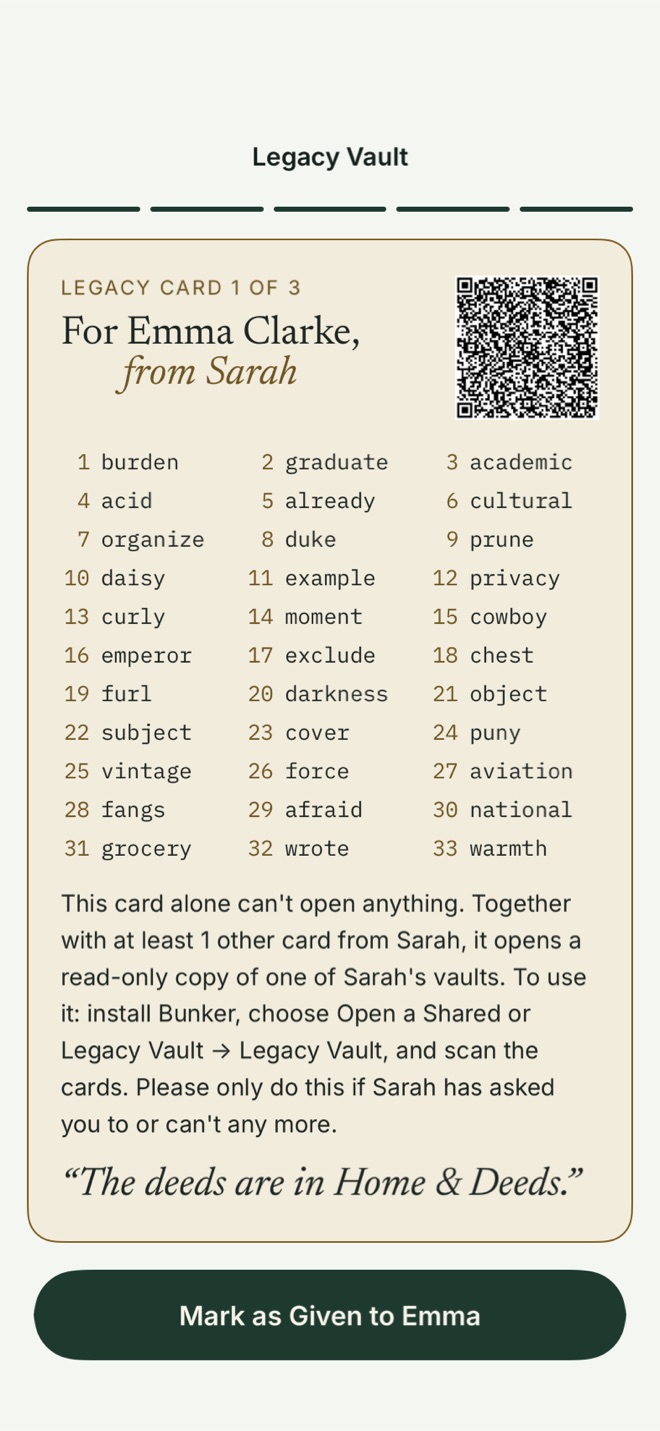
In Bunker (with Bunker Pro), you make a vault a Legacy Vault, choose up to 5 trusted contacts and decide how many must come together: any 2 of 3 by default. Each contact gets a printed Legacy Card. A card alone opens nothing (unless you chose a set of 1). With enough cards, they open a read-only copy of that vault, and your other vaults are never included or revealed. Being a trusted contact is free. After setup, Bunker suggests adding your Apple Legacy Contact too.
The differences are worth knowing:
| Apple Legacy Contact | Bunker Legacy Vault | |
|---|---|---|
| Needs a death certificate | Yes, Apple reviews it | No |
| Can be used while you’re alive | No | Yes, by enough contacts together (see below) |
| One person can act alone | Yes, each contact | No, unless you chose 1 of 1 |
| What’s included | All of your iCloud data | One vault you choose |
| Time limit | 3 years from approval | None set by Bunker |
The honest limit on Bunker’s side: it can’t know whether you have died. In this version, enough trusted contacts acting together can open a Legacy Vault at any time, including while you’re alive. Bunker usually lets your devices know afterwards, but that’s best-effort and doesn’t stop them. A waiting period you could cancel is planned, not built yet. Choose people you’d trust with that vault today.
If you have nothing private beyond iCloud, Apple’s Legacy Contact on its own may be all you need.
An example
Sarah adds her daughter, Emma Clarke, as her Apple Legacy Contact, sends the key by iMessage and prints a copy for the envelope her lawyer, James Miller, keeps with her will. Her passwords go in a password manager with emergency access. Her “Family Papers” vault in Bunker, with scans of her deeds and insurance policies, becomes a Legacy Vault that any 2 of Emma, Olivia Bennett and James can open.
This is general information, not legal advice. Your will can say how you want your digital accounts handled, and a lawyer can tell you what that means where you live.
Related
Questions
Does my Legacy Contact need an iPhone?
No. Apple says they don't need an Apple Account or an Apple device to be added. To use the access key after your death, they'll set up an Apple Account as part of the request.
Can a Legacy Contact see my saved passwords?
No. Apple excludes iCloud Keychain, which holds saved passwords, passkeys, Wi-Fi passwords and payment details.
How long does a Legacy Contact have access?
Apple says access lasts 3 years from when it approves the first Legacy Contact request. After that, the account is permanently deleted.
Can a Legacy Contact open my Bunker vaults?
No. A Bunker vault stays encrypted inside your iCloud data. Only its Pattern or its Recovery Phrase opens it, or, if you made it a Legacy Vault, enough Legacy Cards open a read-only copy.